WooCommerce Health Dashboard: Revenue Data Next to Site Monitoring
A client’s store goes down for twenty minutes on a Tuesday afternoon. Your monitoring catches it, resolves it, and the incident report reads clean: brief outage, quickly fixed. What that report doesn’t say is how many actual orders were lost during those twenty minutes — because the tool that tracks uptime and the tool that tracks revenue have never once talked to each other.
Table of contents
- The problem with two separate dashboards
- How the connection works
- What this changes in the actual client conversation
- FAQ
- Connecting a store in practice
- Who actually benefits from this specifically
The problem with two separate dashboards
Technical health and business performance for the same WooCommerce store usually live in two entirely disconnected places — your monitoring dashboard, and the store’s own WooCommerce admin. The two only ever get compared if someone happens to think to check both at the same time, which in practice means the connection between a technical incident and its real business cost almost never gets made at all, unless a client happens to bring it up first.
How the connection works
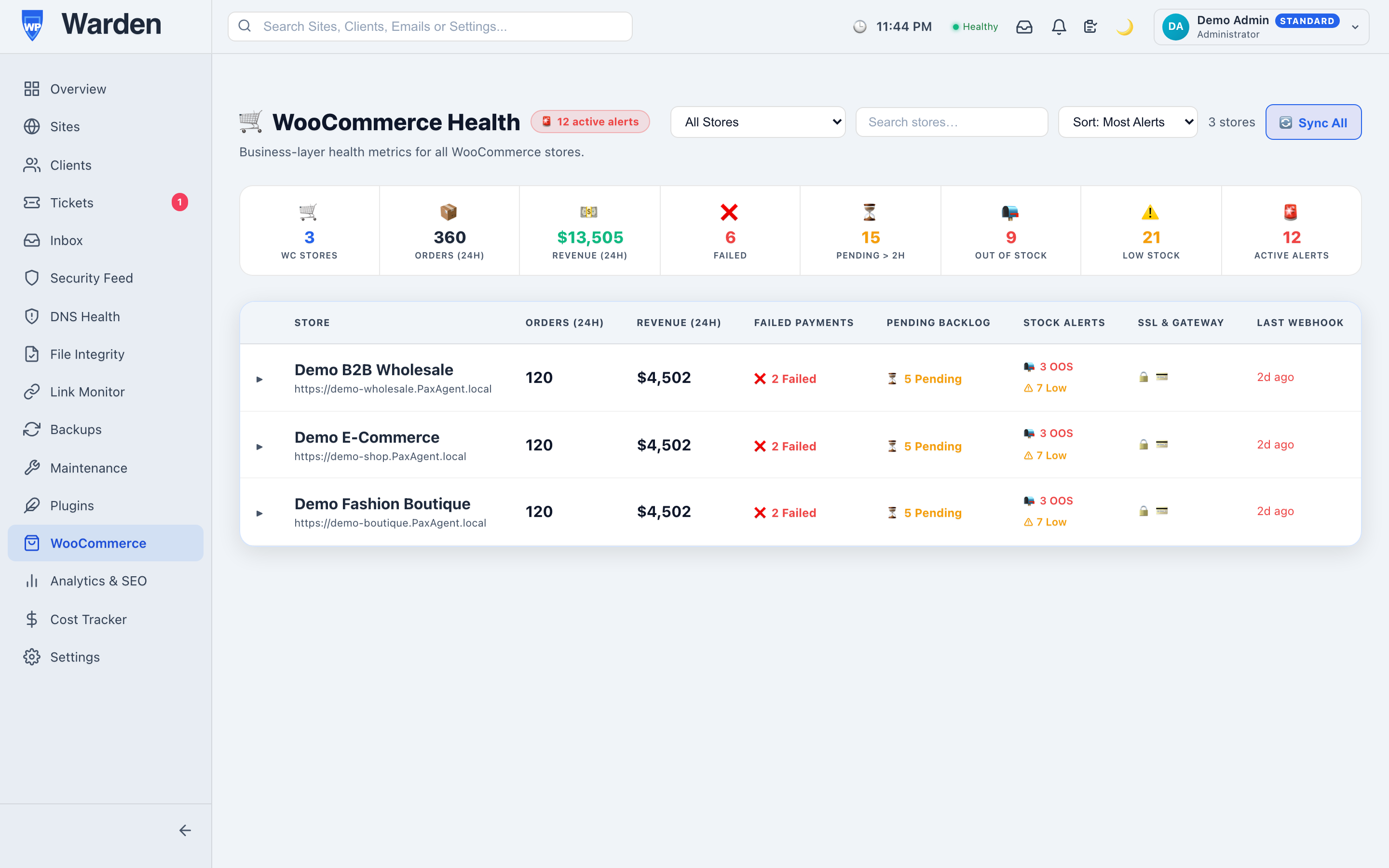
Connect a store’s WooCommerce REST API credentials, and WP Warden’s WooCommerce integration shows revenue, order count, and top-selling products directly alongside that site’s health and uptime monitoring — real store data pulled straight from the store’s own API, not an estimate inferred from general site traffic.
What this changes in the actual client conversation
Back to that Tuesday afternoon outage. With revenue data sitting in the same view, the incident report can say something much more specific: the outage happened during a two-hour window that historically accounts for roughly this many orders, and here’s what recovery looked like immediately after. That’s a fundamentally different, more credible conversation than a purely technical summary — it speaks the language a client actually cares about, which is rarely uptime percentages and almost always dollars.
Connecting a store in practice
Generating WooCommerce REST API credentials takes a few minutes from the store’s own WooCommerce settings, and connecting them to WP Warden is a one-time step per store. The connection is read-only by default, meaning there’s no risk of an accidental change to orders or products from the monitoring side — it’s purely a window into data the store already generates on its own, not a new system that could interfere with how the store actually processes real transactions.
Who actually benefits from this specifically
This matters most for agencies managing more than a couple of WooCommerce stores — below that, checking each store’s own admin individually is genuinely fine. Past that point, having revenue visible in the same fleet view you already check daily removes a real, recurring reason to open a separate tab for every single store, every single day, just to get a sense of how things are going commercially.
FAQ
Is this real WooCommerce data or an estimate?
Real data, pulled directly from the store’s own REST API, not an estimate derived from general site activity.
Do I still need the separate WooCommerce admin dashboard?
For day-to-day site health and revenue overview, no — this brings both into the same view you already use for monitoring.
Start a free 14-day trial — no credit card required.