WordPress Site Alerts: One Unified System Instead of Five Separate Dashboards
Run enough separate WordPress monitoring plugins and you eventually recreate the exact problem monitoring was supposed to solve: five different dashboards, each with its own idea of what counts as an “alert,” none of them talking to each other, and a morning routine that involves checking all five before you can say with any confidence that nothing’s actually wrong. A problem doesn’t care which plugin happened to detect it — your alert system shouldn’t either.
Table of contents
- How WP Warden’s alert system works
- Why one dashboard beats five plugin dashboards
- Snoozing a known issue instead of living with the noise
- The intelligence layer that keeps this from becoming noise itself
- FAQ
- What morning triage actually looks like with this in place
How WP Warden’s alert system works
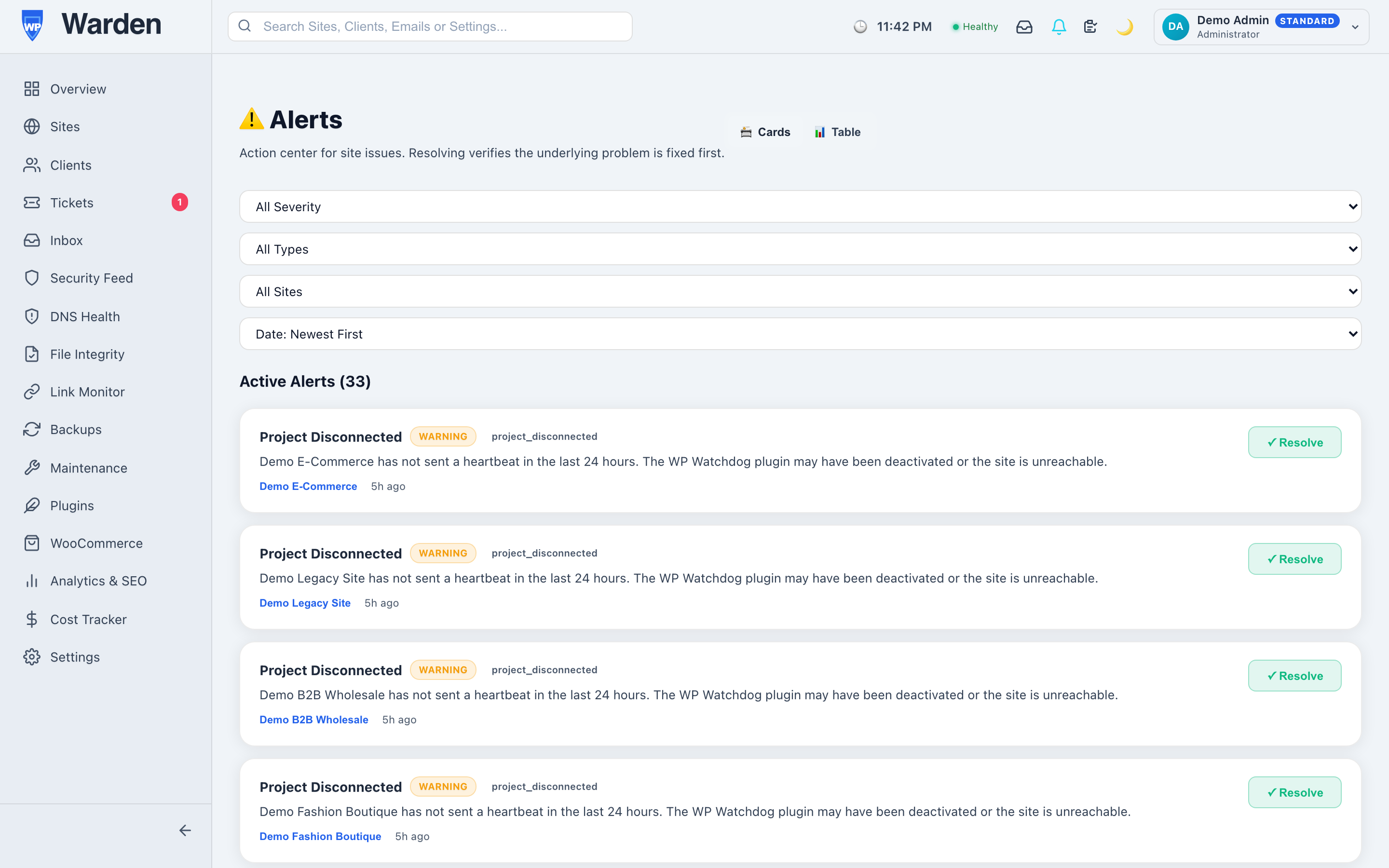
Every monitoring engine in WP Warden — uptime, link monitoring, malware scanning, DNS health, and more — feeds the same central alert system. Every alert carries a type, a severity level, the specific site it belongs to, and a timestamp, and can be snoozed, manually resolved, or left for the auto-resolution engine to close on its own once the underlying condition is actually confirmed gone, not just assumed to be.
Why one dashboard beats five plugin dashboards
Picture a fairly typical setup: a security plugin’s own admin screen for vulnerability warnings, a separate uptime service’s dashboard, a DNS checker somewhere else, and a manual habit of clicking through broken links once a week if there’s time. On a bad week, catching everything means checking four different places, and it’s exactly the week you’re busiest that one of them gets skipped — usually the one that would have mattered.
A single unified list removes that specific failure mode. Every category of problem across every site lands in the same place, so “did I check everything today” has one honest answer instead of four separate ones you have to individually confirm.
Snoozing a known issue instead of living with the noise
Not every open alert needs solving today. A DNS propagation warning during a planned migration, or a link you know is temporarily down while a client’s other vendor fixes something on their end — these are real, known, and temporarily acceptable. The instinct is usually to just close the alert and move on, but that means losing track of it entirely. Snoozing it to a specific date instead keeps it visible on a schedule that actually matches reality, rather than disappearing into a closed-alerts list nobody revisits or nagging every single day for a problem you already know about.
The intelligence layer that keeps this from becoming noise itself
A unified alert list solves fragmentation, but at real scale it can introduce a new problem: volume. That’s what alert notification intelligence is for — correlating related events (the same attacking IP hitting twenty sites in an hour becomes one alert, not twenty separate ones) and batching repetitive notices (like daily update availability) into a single digest window, so what actually reaches your inbox is something worth reading rather than something you’ve trained yourself to skim past. All of it still arrives instantly over the same live connection that updates your dashboard’s alert badge the moment something happens — correlation doesn’t mean waiting longer to find out.
What morning triage actually looks like with this in place
Opening a single alert list at the start of the day and seeing three items — a snoozed DNS warning nobody needs to act on yet, one auto-resolved overnight blip, and one genuinely new issue needing attention — takes under a minute to fully process. The alternative, checking four or five separate tools each with their own version of “is everything okay,” easily takes ten times as long and still risks missing something because no single view ever showed the whole picture at once.
FAQ
Does every monitoring feature feed the same alert list?
Yes — uptime, links, malware, DNS, and cron heartbeats all report into one unified system rather than separate dashboards you’d otherwise have to check individually.
Can alerts resolve themselves?
Some can, automatically, once a later check genuinely confirms the original condition is gone. Anything requiring real human judgment, like a malware finding, always waits for a person to review it.
Start a free 14-day trial — no credit card required.