RESTORE ONE PAGE,
NOT THE WHOLE SITE.
Scheduled automated backups with three levels of restore: whole site, single file or post, and scoped plugin rollbacks.
- Three levels of restore
- Backup before every update
- Verified in client reports
Restore point from 3 days ago
- Homestays as today
- Pricing pagerestored from the restore point
- Blog postsstays as today
- New comments and ordersstay as today
PRECISION RECOVERY,
NOT JUST ALL-OR-NOTHING.
Most backup plugins force you to roll back the entire database and files, losing today's new comments, orders, and edits. We provide three distinct recovery levels.
Level 1: Whole-site restore
Put the entire site back to a previous restore point. Incremental chains are verified before anything is overwritten.
- Complete database & files
- Pre-flight chain verification
- One-click execution
Level 2: Time Machine restore
Restore one deleted image, an overwritten page, or an altered file from recent backups without disturbing the rest of the site.
- Individual posts and pages
- Media library items
- Specific theme and core files
Level 3: Scoped plugin rollback
A targeted snapshot taken right before an update lets you roll back just that one updated plugin or theme if conflicts arise.
- Scoped pre-update snapshot
- Zero database rollbacks needed
- Immediate rollback verification
AUTOMATED, EFFICIENT,
AND VERIFIED.
INCREMENTAL AND FAST,
GENTLE ON SERVERS.
After the initial full baseline backup, our engine captures only modified files and database records. Backups complete quickly without exhausting host memory.
Scheduled retention policies
Backups run automatically during off-peak hours and older archives are rotated cleanly according to plan policies.
Large site slicing
Extensive media libraries and large WooCommerce catalogs are split into manageable chunks that respect shared host timeouts.
Clear failure diagnostics
If an archive fails due to host disk limits or network interruptions, the platform logs the exact cause immediately.
RESTORE POINTS BEFORE
EVERY SINGLE UPDATE.
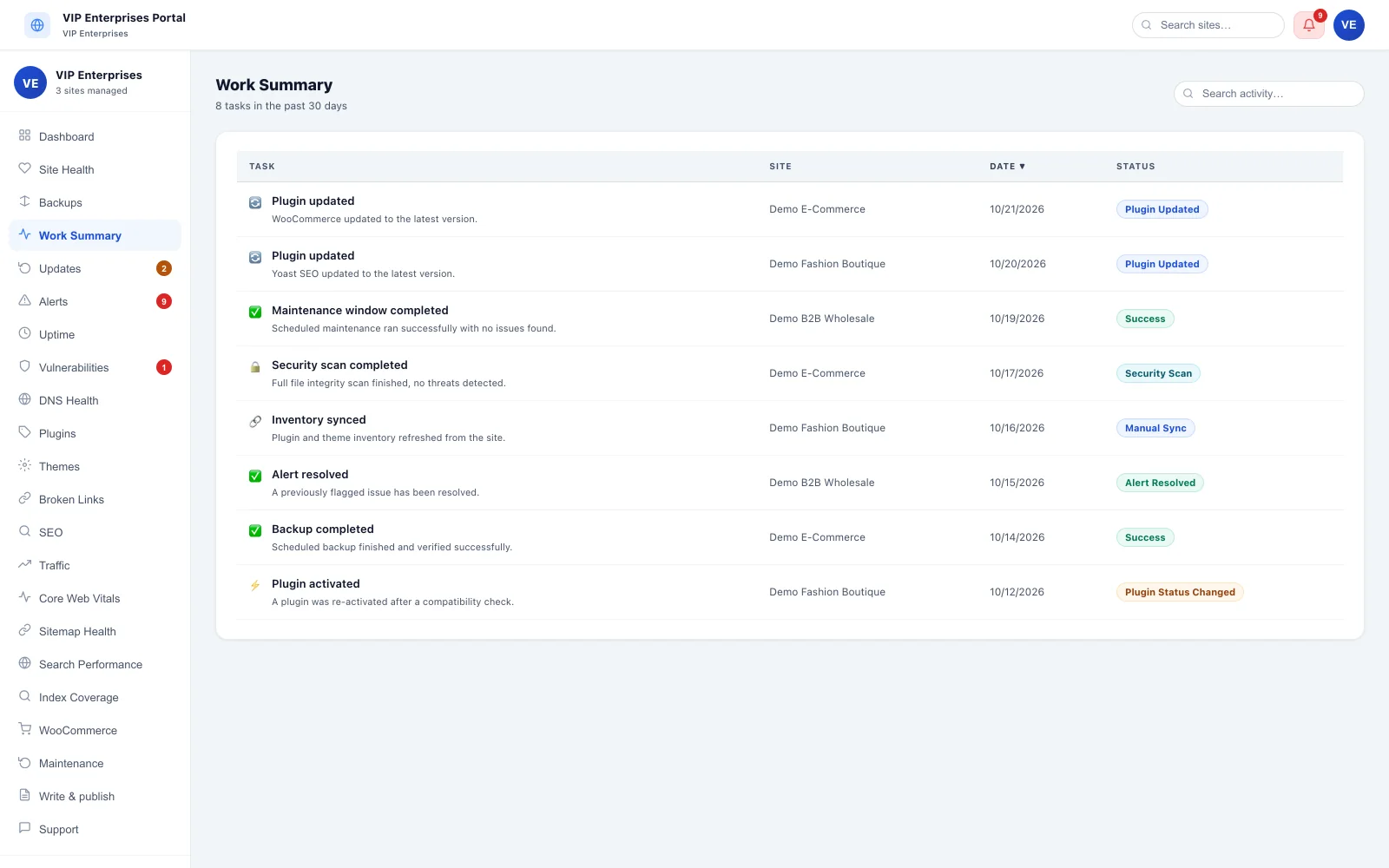
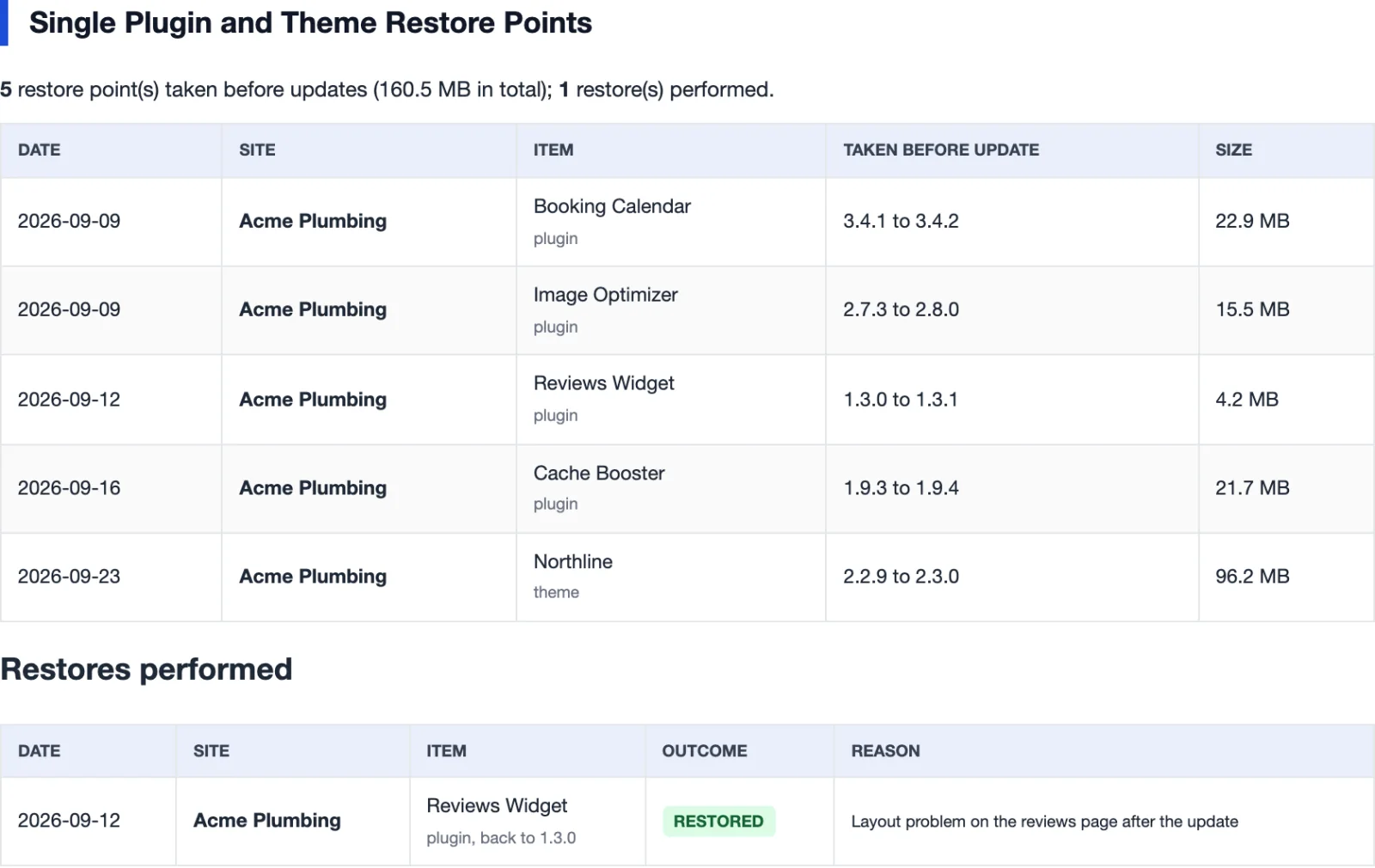
We never update WordPress core, plugins, or themes blindly. A verified restore point is captured first, so your site can revert quickly if an update misbehaves.
Automated pre-update snapshot
Captured automatically before scheduled maintenance or security patch runs.
Transparent report logging
Every restore point and rollback is documented line-by-line in your monthly health report.
Visual check verification
On Plus and Pro plans, before-and-after visual comparisons check key pages for layout shifts.
SEE EVERY BACKUP
FROM YOUR PORTAL.
Your client portal lists each completed backup with its type, date, size and where it is stored, so you can see for yourself that backups are running.
Full and incremental backups
Each entry shows whether it was a full or an incremental backup and how big it is.
Where each copy is stored
A storage label on every row shows where the archive is kept.
Searchable history
Search the list to find the backup you are looking for.
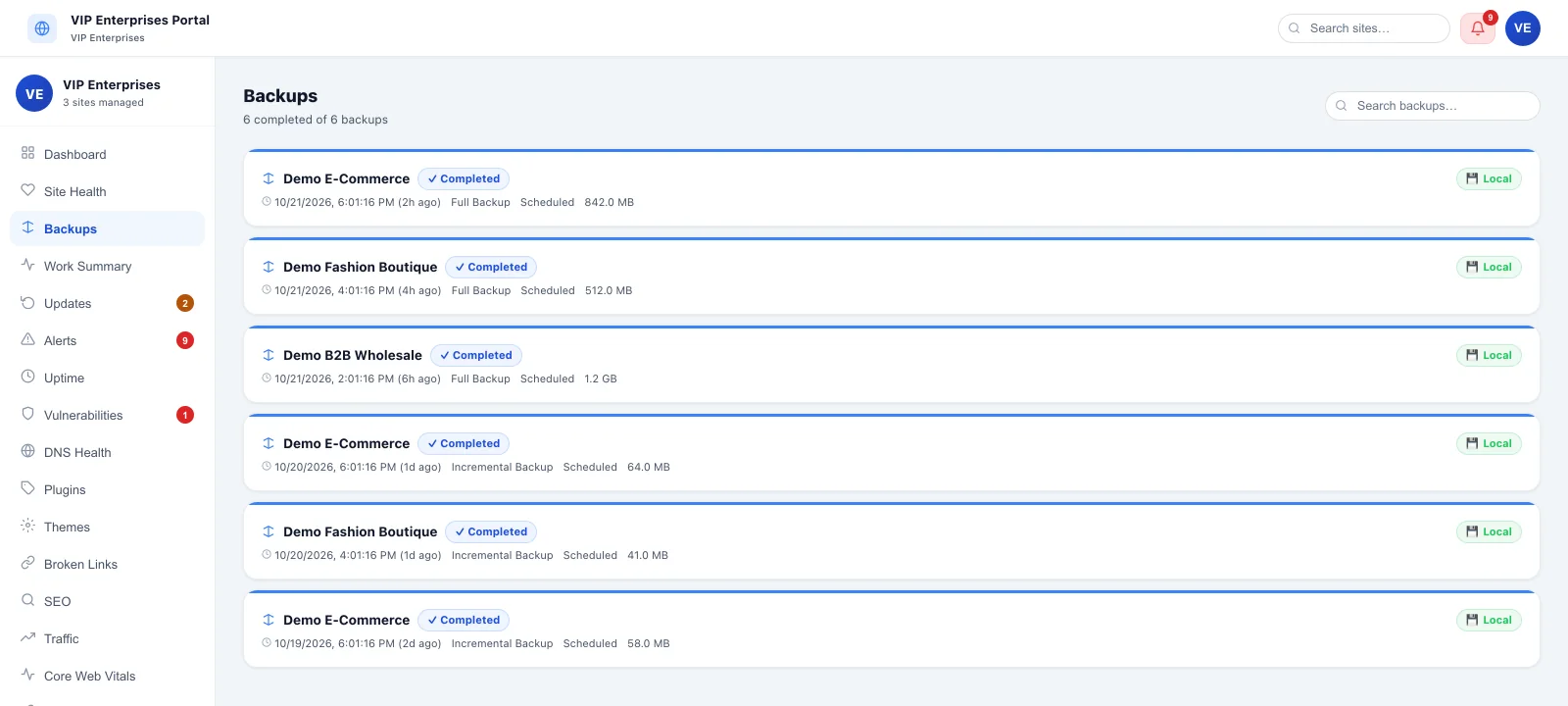
Screens show demo data from the WP Warden live demo.
OFF-SITE COPIES,
SAFE FROM HOST FAILURES.
A backup stored only on your web server is useless if the server crashes or gets compromised.
Redundant storage architecture
- Independent cloud storageBackup archives are encrypted and streamed off-site to dedicated cloud infrastructure separate from your server environment.
- Integrity verificationEvery archive is tested with integrity validation upon completion so corrupted files are detected before you need them.
- Time Machine local catalogA local index of files and posts enables fast browsing when you need to recover a single item quickly.
Storage retention periods are configured according to your selected care plan tier.
WHAT BACKUPS
CANNOT PREVENT.
Backups are vital insurance, but understanding what they do not do keeps expectations aligned.
Does not prevent downtime
Backups let you recover quickly from errors, but they do not prevent server downtime, network outages, or hardware failures.
Not a security firewall
While backups allow restoring clean versions after an intrusion, proactive login protection and file integrity scans are what prevent hacks.
Store orders need care
Rolling back an entire database on a busy store can overwrite recent customer orders. That is why Time Machine single-item restores are essential.
FREQUENTLY ASKED
QUESTIONS.
Answers about backup schedules, retention, and restore processes.
How long are backups kept?
Where are backup archives stored?
Can I restore just one post, page, or image?
Can I download a full backup copy myself?
What happens to WooCommerce orders if I restore a backup?
READY FOR RELIABLE
WORDPRESS BACKUPS?
Included on every care plan with automated scheduling, monitoring, and restore support.