
Copyroom for WordPress
A QUIET PLACE TO WRITE.
A CALM WAY TO PUBLISH.
Copyroom transforms WordPress into a calm, document-style editor for your writers, with zero wp-admin clutter.
- Free plugin, Pro from $59 a year
- Distraction-free writing canvas
- Saves clean WordPress blocks
Why Copyroom
WRITERS SHOULD WRITE,
NOT WRESTLE WITH WP-ADMIN.
The WordPress admin was built for site administrators, not storytellers. Copyroom gives your writers a quiet room to craft articles and publish with confidence.
No formatting headaches
Stop copying and pasting between external editors and WordPress. Headings, spacing, and embed blocks look right from the start.
Zero admin confusion
Writers see only the canvas and the content table. Core site settings, plugins, and menus stay protected.
Comfort for long writing sessions
Low-glare comfort themes, focus outlines, and responsive previews designed specifically for writers.
Three simple steps
INSTALL IT, PICK YOUR WRITERS,
THEY START WRITING.
01
Install the plugin
Add Copyroom to your WordPress site like any other plugin. Nothing is sent to us, and no account with us is needed.
02
Choose who writes in Copyroom
Pick the user role that should use it. When those users open a post or page, WordPress sends them to Copyroom instead of the standard editor.
03
Write and publish
Writers preview, draft and publish (Pro adds scheduling and automatic saving). What they may publish is still decided by their WordPress role.
Document editor
A CALM CANVAS,
NOT A DASHBOARD.
The editor is the same on Free and Pro. Pro adds the tools a team needs around it.
Free and Pro
FAMILIAR LAYOUT,
NOTHING EXTRA.
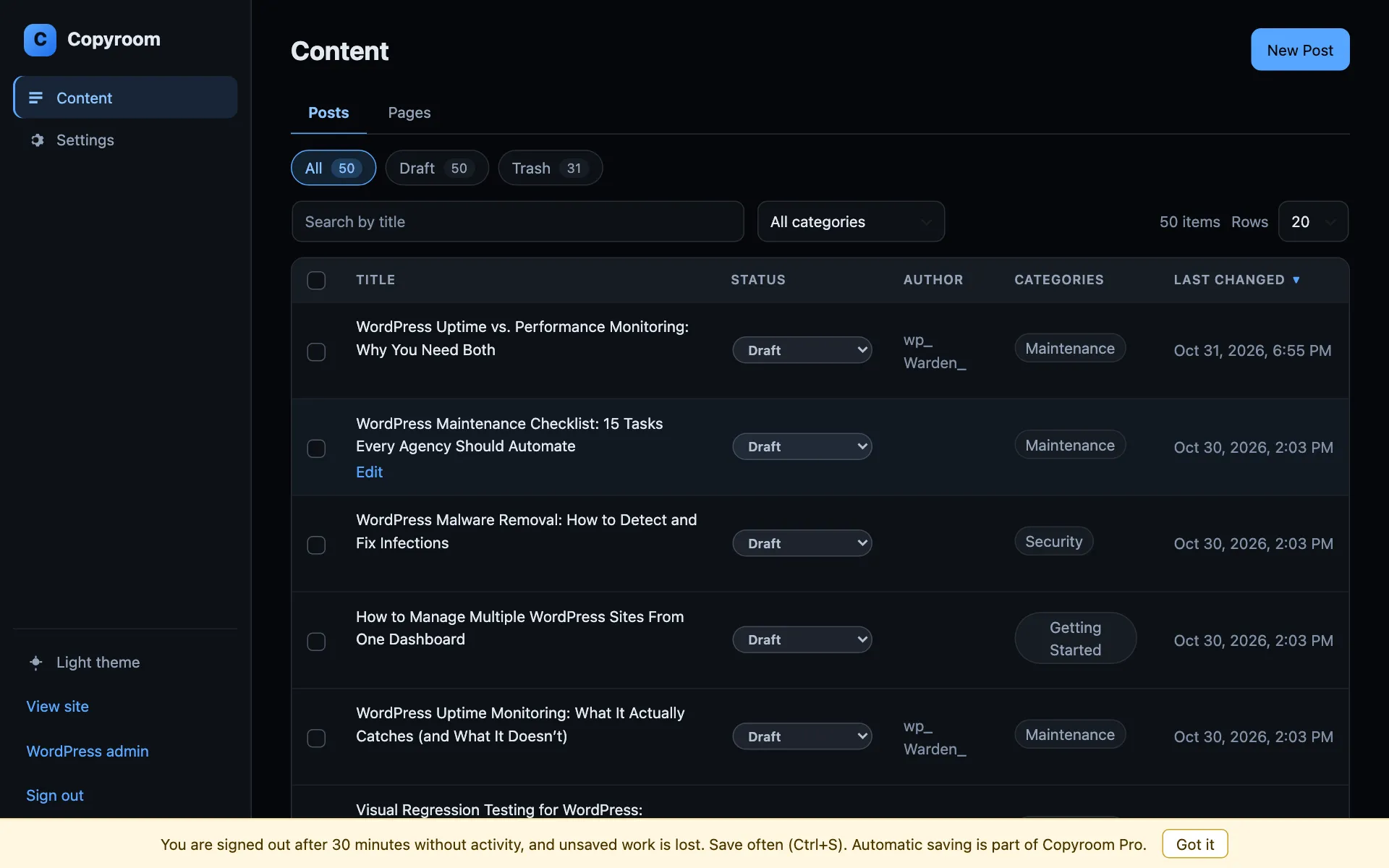
A menu bar, one toolbar, an outline of the headings and a page that uses your theme's own fonts and colours.
Everyday formatting
Headings, lists, quotes, images, buttons, columns, tables and video embeds.
Outline
Jump between headings in long articles and guides.
Your theme's look
The page looks the way it will on the site, so publishing holds no surprises.
No silent overwrites
If two people change the same post, Copyroom stops the second save and says so.
Free and Pro
PREVIEW IT AS VISITORS
WILL SEE IT.
Preview shows the draft on your own site, in your theme, including changes that are not saved yet. Nothing is published until the writer decides. Preview is free.
Device widths
Switch between desktop, tablet and phone.
Open in a new tab
A short-lived private link shows the draft without publishing it.
Back to editing
One button returns to the draft where you left it.
Pro
SCHEDULE, SAVE
AND GO BACK IN TIME.
Choose a publish date, let drafts save themselves, and look at earlier versions of a post.
Schedule for later
Choose a date and time; WordPress publishes the post then.
Autosave
Drafts are saved in the background every minute, and once more just before an idle sign-out. On by default in Pro.
Revisions
Look at earlier versions and bring one back.
Clips are recorded from the editor Copyroom is built on, with demo content. Small details may change before launch.
Agency and team control
POWERFUL TOOLS
FOR GROWING SITES.
Pro is a second plugin that adds to the free one. It includes every Pro feature; there is no higher tier.
Pro
INTERACTIVE TABLES
AND SEO FIELDS.
Build tables visitors can search and sort, and fill in the SEO title, description and focus keyword next to the draft.
Search and sort
Price lists, directories and schedules visitors can filter on the page.
SEO fields
Works with the popular WordPress SEO plugins already on your site.
Your name on it
Your own title and logo on the sign-in page and in the editor header.
Pro
WRITING HELP WITH
YOUR OWN AI KEY.
Proofread, rewrite, shorten, lengthen, change the tone, and draft meta descriptions and image alt text. A suggestion changes nothing until the writer accepts it.
Your key, your provider
Add an API key from the AI provider you already use. We never see it or the text.
Only the selected text
Copyroom sends only the text the writer selected, never the whole site.
One click to undo
Accepting a suggestion is a single undo step.
A sign-in page of your own
A branded sign-in page with your logo, colours and a path you choose takes writers straight to Copyroom. If your site uses a two-step sign-in plugin, Copyroom respects it and never works around it.
Choose exactly who writes
Assign roles, individual users or a mix, and decide per assignment whether they may publish or only save drafts.
Two-step verification
An extra code check for Copyroom only, with an authenticator app and backup codes. Make it optional or required. It never replaces WordPress sign-in rules and does not touch wp-admin.
Autosave and time-out
Drafts save themselves every minute and just before an idle sign-out, so a time-out never costs a writer their work.
Settings in one place
Manage writers, the time-out, licence, sign-in page and AI key from the Copyroom home or from Settings in WordPress. Both show the same settings.
Revisions and SEO fields
Bring back an earlier version, fill in the SEO title, description and focus keyword for the SEO plugin you already use, and see a plain 100 point checklist of what to improve. The checks run in the browser: no AI, nothing sent.
Clips are recorded from the editor Copyroom is built on, with demo content. Small details may change before launch.
Fair pricing
FREE TO START,
PRO PER SITE.
Pro is a yearly licence for 1, 5 or 15 sites, and $25 a year for each site after 15. Writers are unlimited on every licence.
Free
$0
Clean document editor, one writer role, drafts and preview.
- Document-style editor
- All your content types
- Preview, drafts and publishing
- Content table with search and filters
- One writer role, idle sign-out
Solo, 1 site
$59 /year
Every Pro feature for one website.
- Everything in Free, plus:
- Scheduling, autosave and revisions
- Eye-comfort themes and screen dimmer
- Branded sign-in page, two-step verification
- Roles, users or a mix
- Tables, SEO fields and AI writing help
- Email support and updates
Team, 5 sites
$149 /year
For a small team or a few client sites.
- Everything in Solo, on up to 5 sites
Agency, 15 sites
$299 /year
For agencies with many client sites.
- Everything in Solo, on up to 15 sites
- More sites: $25 per site per year, added to the same key
| Feature | Free | Pro |
|---|---|---|
| Writing | ||
| Document-style editor for posts and pages | ✓Included | ✓Included |
| Custom post types | ✓Included | ✓Included |
| Save drafts and publish (as the WordPress role allows) | ✓Included | ✓Included |
| Preview a draft on your site (desktop, tablet, phone) | ✓Included | ✓Included |
| Text mode for pages made with a visual design tool | ✓Included | ✓Included |
| Schedule for later | –Not included | ✓Included |
| Autosave drafts | –Not included | ✓Included |
| Revisions | –Not included | ✓Included |
| Content table | ||
| Search, sort and filter by status and category | ✓Included | ✓Included |
| Change status and move categories, one or many | ✓Included | ✓Included |
| Dark and light themes | ✓Included | ✓Included |
| Access and security | ||
| Who uses Copyroom | One user role | Roles, users or a mix |
| Sign-in | WordPress login | Branded sign-in page on a path you choose |
| Idle time-out | ✓Included | ✓Included |
| Draft-only or publish rights per person | –Not included | ✓Included |
| Copyroom two-step verification (authenticator app) | –Not included | ✓Included |
| Settings in Copyroom and in WordPress | ✓Included | ✓Included |
| Extras | ||
| Interactive tables (search and sort) | –Not included | ✓Included |
| Design tools: fonts, copy style, charts, equations, symbols, table styles, cover image position | –Not included | ✓Included |
| SEO fields for your SEO plugin | –Not included | ✓Included |
| Writing checks: a plain 100 point checklist for SEO and readability | –Not included | ✓Included |
| AI writing help with your own API key | –Not included | ✓Included |
| Your title and logo on the sign-in page and editor | –Not included | ✓Included |
| Support | ||
| Updates | From WordPress.org | Included while the licence is active |
| Support | Community forum | Email support |
Copyroom is not released yet. Prices are what we plan to charge at launch. Join early access and we will tell you when it is ready.
Safe by design
BUILT NOT TO
BREAK YOUR SITE.
What Copyroom does, and how it keeps your site stable.
Standard WordPress blocks
Copyroom saves native block markup. Any block outside the editor is locked and preserved unchanged.
Your permissions stay yours
Authors draft and publish; contributors submit for review. WordPress roles govern every action.
Your database, your data
Drafts and images are saved directly in your WordPress database. Zero external tracking.
Admins keep control
Administrators can open the standard WordPress editor anytime and manage settings without interruption.
Editorial deep dives
WHY WRITERS CHOOSE
COPYROOM.
Explore how Copyroom solves the most common editorial headaches for content teams.
Stop pasting from Google Docs
See our 45-minute workflow audit: how drafting directly in WordPress saves 26 minutes of formatting repair per post.
A Gutenberg alternative for writers
Why content teams prefer a quiet, continuous document canvas over floating block popups and design tool noise.
WP Warden family
WANT US TO LOOK AFTER
THE WHOLE SITE?
Copyroom comes from the team behind WP Warden care plans. On the Plus and Pro care plans the same editor is built into your client portal, next to backups, updates, monitoring and your monthly report.
Common questions
QUESTIONS ABOUT
COPYROOM.
Is Copyroom free?
Yes. The free plugin includes the editor for posts, pages and custom post types, drafts and publishing, for one user role. Copyroom Pro adds scheduling, review mode, revisions, the branded sign-in page, finer access control, tables, SEO fields and AI writing help.
Do my writers need to use wp-admin?
No. On the free plugin they sign in with the normal WordPress login and go straight to Copyroom. With Pro they use your own branded sign-in page and never see the WordPress screens.
Does Copyroom send my content anywhere?
No. Your posts and drafts stay in your WordPress database. The free plugin makes no outside connections. Pro checks its licence with our payment provider, and AI writing help sends only the selected text to the AI provider whose key you added.
Will it break my existing posts?
No. Copyroom saves standard WordPress blocks, and any block it cannot edit is locked and saved back unchanged.
Does it work with pages made in a visual design tool?
Pages made with one popular visual design tool open in text mode, so you can change the words without touching the layout. Pages made with other design tools open read-only, so nothing in their layout can change.
How is Pro licensed?
Per year: 1 site, 5 sites or 15 sites, and $25 a year for each site after 15. Every licence covers unlimited writers. You get a licence key and the Pro plugin by email; install it, paste the key into Copyroom on each site, and that uses one of your sites. Each activation is locked to that site’s address. While the licence is active you get updates and email support. The docs explain licence keys step by step.
What happens if my Pro licence expires?
Your writers keep working. Pro features stay on for 30 days after the licence ends, so you have time to renew. After that Copyroom carries on as the free plugin and nothing is deleted. Pro updates and support need an active licence.
Can I use my own two-step plugin as well?
Yes. Copyroom never signs anyone in by itself, so your site’s own two-step sign-in keeps working. Copyroom Pro can add its own code check as an extra layer that applies to Copyroom only, never to wp-admin.
Will a time-out lose my writers' work?
On Pro, drafts save themselves every minute and once more just before an idle sign-out. The free plugin warns writers to save before the time-out ends.
Where are the instructions?
In the Copyroom documentation: install, choose writers, the sign-in page, two-step verification, writing help and licence keys.
How is Copyroom related to WP Warden care plans?
Copyroom is the standalone version of the content editor in our care plans. You can use Copyroom on its own, or let us look after the whole site with a care plan.
GIVE YOUR WRITERS
A QUIET PLACE TO WORK.
Copyroom is almost ready. Join early access and we will email you when it launches.