THE ROUTINE WORK,
OFF YOUR PLATE.
Three monthly plans on one platform: backups, updates with a restore point taken first, monitoring and a report you can read, plus a portal of your own. Pick by how much you want done for you and how much you publish yourself.
- From $79 a month
- Restore point before updates
- Portal and report on every plan
START WITH WHAT
YOU NEED DONE.
Choose the smallest plan that covers the site. Each card also says when it is not enough.
Starter $79 a month
A brochure site you mainly want backed up, updated and watched, with a portal and a monthly report.
Not enough if writers need to publish without WordPress admin, or you want security scanning or page-level restore.
Plus $149 a month
You publish regularly and want security scanning, restore of one page or file, and writers out of WordPress admin.
Not enough if you want the AI-assisted risk check before updates, or restore of a single plugin or theme.
Pro $299 a month
A bad update would be costly. Adds the risk check before scheduled updates, single plugin or theme restore and AI writing help.
More than a small brochure site needs.
Custom Let's talk
A store, a larger site, several sites or special requirements.
There is no standard price. Contact us and we scope it with you.
PICK THE PLAN
THAT FITS THE SITE.
Plans are priced monthly. Billing details are confirmed with you before anything starts.
Starter
$79 /month
Backups, updates and monitoring for a site that needs the basics covered.
- Automated backups with restore points
- Managed core, plugin and theme updates, with a restore point taken first
- Uptime monitoring with alerts
- Monthly health report: the branded WP Warden client report
- Client portal with support tickets
Plus
$149 /month
Security scanning, hardening and the client content editor.
- Everything in Starter, plus:
- Vulnerability monitoring
- File-integrity and malware scanning with quarantine
- Login protection and hardening
- Visual checks after updates, listed in your report
- PHP error monitoring
- DNS and email health checks
- Time Machine restore of individual files, posts and pages, listed in your report
- Client content editor: write, schedule and publish posts and pages, with an activity summary in your report
Pro
$299 /month
AI-assisted update review, AI writing help and single plugin or theme restore.
- Everything in Plus, plus:
- AI-assisted update risk review before scheduled updates: higher-risk updates wait for your approval
- AI writing help inside the editor
- Scoped-snapshot restore of a single plugin or theme, with the restore points listed in your report
- Optional written summary of the period in your reports (AI-assisted)
Custom
Let's talk
For sites that need something more than the standard plans.
- Larger sites
- WooCommerce stores
- Multi-site setups
- Special requirements
Risk reversal. Plans are monthly. You can cancel before your next renewal and the service runs to the end of the month you paid for. The first monthly fee is refundable if you cancel within 14 days of your first payment. Details are in the Terms.
WHAT YOU PAY FOR,
AND WHEN IT PAYS OFF.
You pay for work that is done, a restore point when something goes wrong, one place to look and a person reading the results. Money-wise it depends on what you pay for today.
+$281 to +$1,671 a year
saved by a content team on Plus when a freelancer or developer publishes for them today.
-$298 to +$195 a year
for a small site on Starter: it costs more than the cheapest tools and pays off only once paid routine work is counted.
$129 to $919 a year more
on Plus if your team already publishes its own content and only tools are counted.
Typical list prices checked 21 October 2026, one site, hours are assumptions. When you only need one tool, the tool costs less. See the examples and try the calculator.
EVERY FEATURE,
SIDE BY SIDE.
On a narrow screen the table scrolls sideways.
| Feature | Starter | Plus | Pro |
|---|---|---|---|
| Protection | |||
| Managed core, plugin and theme updates, with a restore point taken first | ✓Included | ✓Included | ✓Included |
| AI-assisted risk check before each scheduled plugin or theme update; high-risk updates wait for approval | –Not included | –Not included | ✓Included |
| Visual checks after updates, listed in the report | –Not included | ✓Included | ✓Included |
| Vulnerability monitoring | –Not included | ✓Included | ✓Included |
| File-integrity and malware scanning with quarantine | –Not included | ✓Included | ✓Included |
| Login protection and hardening | –Not included | ✓Included | ✓Included |
| Backups and restore | |||
| Automated backups with restore points | ✓Included | ✓Included | ✓Included |
| Time Machine restore of individual files, posts and pages, from recent backups, listed in the report | –Not included | ✓Included | ✓Included |
| Scoped-snapshot restore of a single plugin or theme, restore points listed in the report | –Not included | –Not included | ✓Included |
| Monitoring | |||
| Uptime monitoring with alerts | ✓Included | ✓Included | ✓Included |
| PHP error monitoring | –Not included | ✓Included | ✓Included |
| DNS and email health checks | –Not included | ✓Included | ✓Included |
| Reporting | |||
| Monthly health report: the branded WP Warden client report | ✓Included | ✓Included | ✓Included |
| Optional written summary of the period, with highlights and recommended next steps (AI-assisted) | –Not included | –Not included | ✓Included |
| Client portal and editor | |||
| Client portal | ✓Included | ✓Included | ✓Included |
| Support tickets from the portal | ✓Included | ✓Included | ✓Included |
| Client content editor: write, schedule and publish, with an activity summary in the report | –Not included | ✓Included | ✓Included |
| AI writing help inside the editor | –Not included | –Not included | ✓Included |
| Setup | |||
| WP Warden set up on your site | ✓Included | ✓Included | ✓Included |
Notes on the table
- The AI-assisted risk check covers scheduled plugin and theme updates only, not core and not updates started by hand. It needs the AI connection set up for your account, and it is listed in your report where that report section is switched on. It is advice, not a promise.
- Restore of individual files, posts and pages works from recent backups.
- The editor works with WordPress block-editor content. Pages made with other layout tools open read-only, or in text-only mode where supported. It needs a WordPress user assigned to you.
- Security scanning detects, quarantines and hardens. There is no web application firewall and no cleanup service.
- Uptime checks run from one location.
Need something that is not on this table? Custom plans cover larger sites, WooCommerce, multi-site and special requirements.
WHAT IS
NOT INCLUDED.
A care plan is routine maintenance, monitoring and reporting. These things sit outside it.
- Content writing by us. You write your own posts and pages, with the editor on Plus and Pro.
- Custom development, new features and redesigns. A new website build, store or Google setup is a separate project, by request.
- A web application firewall, or a person who cleans up a hacked site.
- Servers and domain registration. A care plan works with the site where it already runs. Providing the server it runs on and registering domains are not part of a plan.
- Purchases of plugin or theme licences.
- Features of a higher plan. Each plan covers what its column lists.
- Promises about response times, uptime numbers or results. We describe what the platform does, not what it will achieve.
ABOUT THE
PLANS.
How do I choose between the plans?
Start with what you want done. Starter backs up, updates and watches the site. Plus adds security scanning, page-level restore and the editor, so writers can publish without WordPress admin. Pro adds the AI-assisted risk check before scheduled updates, single plugin or theme restore and AI writing help. If you are unsure, start with the free health check or contact us.
Why pay for a plan when plugins are free?
Some pieces are free, and the cost comparison shows dated prices, including the cases where the separate pieces cost less than a plan. A plan puts the work in one place with a person reading the results, and adds the editor and page-level restore. If you only need one tool, buy that tool.
What does the AI-assisted risk check do?
Before each scheduled plugin or theme update, it rates the update low, medium or high using your own site's history and the public changelog. High-risk updates are held until we approve them. It does not cover core updates or updates started by hand, it needs the AI connection set up for your account, and it is advice, not a promise.
What is the difference between Plus and Pro?
Plus adds security scanning, hardening, restore of individual files, posts and pages, extra monitoring and the client content editor. Pro adds the AI-assisted risk check, AI writing help in the editor, restore of a single plugin or theme, and an optional written summary of the period in your reports.
Can I change plans later?
Yes. Contact us and we will move your site to a different plan. Billing details are confirmed with you before anything starts.
What if I want to stop?
Plans are monthly. You can cancel before your next renewal and the service runs to the end of the month you paid for. The first monthly fee is refundable if you cancel within 14 days of your first payment. Details are in the Terms.
Is there a setup fee or a contract length?
Plans are priced monthly. We confirm billing details with you before anything starts.
Can you look after a WooCommerce store or several sites?
Those are handled as Custom plans. Contact us and tell us about the site or sites so we can scope it with you.
Do I get to see what you did?
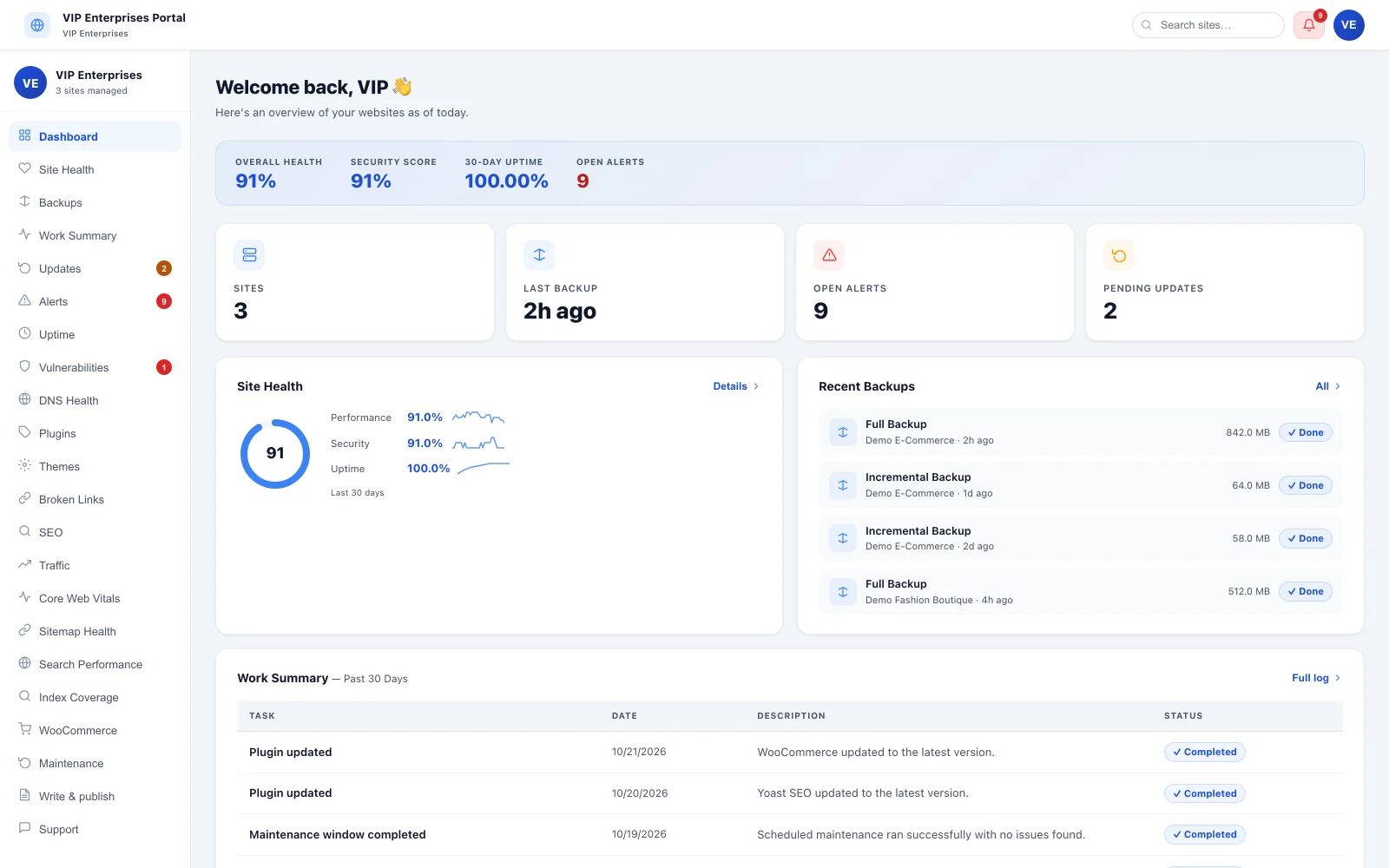
Yes. Every plan includes a client portal and a monthly health report, the branded WP Warden client report, sent as a PDF. The portal shows the work done, your backups and your support tickets.
What if I only need some of the features?
Start with the plan closest to what you need. If something is missing, ask us about a Custom plan.
More answers are on the FAQ page.
READY TO
TALK IT THROUGH?
Contact us and we will go through your site and which plan fits. If the separate tools suit you better, we will say so.